Every tool. Every day.
Your files stay yours.
Merge, compress, convert, sign — 80+ PDF and everyday tools. Free, no signup, and private by default.
Drop a PDF to compress it
It runs in this tab — your file never uploads.
Choose a PDFOpen your Network tab — you’ll see zero uploads.
All tools
Pick a tool — most run right in your browser, nothing uploaded.
Organize PDF· 17
See all 17 →PDF viewer
Open big files fast. Search the text, jump by page.
Runs in your browser
Merge PDF
Combine any number of files. Reorder before you merge.
Runs in your browser
Split PDF
Take one page or a range. The original stays untouched.
Runs in your browser
Compress PDF
Smaller file, text stays sharp. You set the quality.
Runs in your browser
Compress to size
Hit the exact KB limit a portal insists on.
Runs in your browser
Rotate PDF
Turn pages upright. The fix survives saving and reopening.
Runs in your browser
Convert to PDF· 10
See all 10 →Scan to PDF
Photograph paper with your phone. Edges straightened for you.
Runs in your browser
JPG to PDF
Photos into one PDF at full resolution. Set the margins.
Runs in your browser
Word to PDF
Fonts, tables and layout land where you left them.
Processed on our servers
PowerPoint to PDF
Slides become a share-ready PDF that opens anywhere.
Processed on our servers
Excel to PDF
Sheets fit the page, with column widths and formatting kept.
Processed on our servers
HTML to PDFsoon
Renders an HTML file you already have, styles applied.
Processed on our servers
Convert from PDF· 15
See all 15 →PDF to JPG
Every page as an image, at the resolution you choose.
Runs in your browser
Extract images
Pulls out the original pictures, not screenshots of them.
Runs in your browser
PDF to Word
Editable DOCX with the layout and fonts retained.
Processed on our servers
PDF to PowerPoint
Editable slides, with fonts and positioning kept.
Processed on our servers
PDF to RTF
Formatted text any word processor will open.
Processed on our servers
PDF to HTML
Real selectable text, not a page of flat images.
Runs in your browser
Edit & sign· 14
See all 14 →Edit PDFsoon
Change the text and images already on the page.
Runs in your browser
Annotatesoon
Highlight, draw and comment. Several colours and widths.
Runs in your browser
Watermark
Stamp text or a logo. Set position, size and transparency.
Runs in your browser
Overlay PDF
Lay letterhead or a stamp behind every page.
Runs in your browser
Bates numbering
Numbering that runs on across every file in the set.
Runs in your browser
Remove metadata
Strips author, software and revision history.
Runs in your browser
AI document suite
Launching with Pro· answers cite the page · your file never leaves your deviceExplore the suite →Generators· 3
Images & media· 15
See all 15 →Compress image
Smaller JPG, PNG or WebP with the detail kept.
Runs in your browser
Resize image
Exact pixels or a percentage, aspect ratio locked.
Runs in your browser
Crop image
Frame the shot, or crop to a preset ratio.
Runs in your browser
Convert image
Between WebP, PNG, JPG, AVIF and HEIC.
Runs in your browser
HEIC to JPG
iPhone photos anything can open, quality preserved.
Runs in your browser
Background remover
Cuts out the subject and leaves the edges clean.
Runs in your browser
Everyday utilities· 5
Folder previewsoon
Thumbnails for a folder Windows shows as grey icons.
Runs in your browser
Word counter
Words, characters and reading time as you type.
Runs in your browser
Unit converter
Length, weight, temperature, data and more.
Runs in your browser
JSON formatter
Pretty-print, minify, and find the syntax error.
Runs in your browser
Color picker
Pick a colour and copy it as HEX, RGB or HSL.
Runs in your browser
Developer tools· 9
See all 9 →Base64
Encode and decode text or a file, both directions.
Runs in your browser
URL encode
Percent-encode and decode query strings safely.
Runs in your browser
HTML entities
Escape and unescape, so markup renders as text.
Runs in your browser
Hash generator
MD5, SHA-1, SHA-256 and SHA-512, of text or a file.
Runs in your browser
JWT decoder
Read the header and claims without sending the token.
Runs in your browser
UUID generator
Version 4 or 7, one at a time or a thousand at once.
Runs in your browser
Data & spreadsheets· 7
See all 7 →CSV cleaner
Fixes delimiters, blank rows and broken quoting.
Runs in your browser
CSV to JSON
Typed JSON, with the header row as the keys.
Runs in your browser
CSV to Excelsoon
A real .xlsx, with columns sized to fit.
Runs in your browser
Excel to CSVsoon
One sheet or every sheet, in the encoding you need.
Runs in your browser
JSON to Excelsoon
Nested objects flattened to one row per record.
Runs in your browser
XML to Excelsoon
Elements and attributes mapped onto rows.
Runs in your browser
Text tools· 5
Text diff
Line and word changes highlighted side by side.
Runs in your browser
Case converter
camelCase, snake_case, Title Case and six more.
Runs in your browser
Slugify
URL-safe text, with accents and symbols handled.
Runs in your browser
Sort lines
Alphabetical, numeric or reversed. Duplicates removed.
Runs in your browser
Lorem ipsum
Placeholder words, sentences or paragraphs.
Runs in your browser
Workspace· 8
See all 8 →Smart notes
Quick notes that sync across your devices.
Synced to your account
Habit tracker
Daily streaks you can see at a glance.
Synced to your account
Budget tracker
Where the money went, by category and by month.
Synced to your account
Receipt scannersoon
Reads the total, date and merchant off a photo.
Processed on our servers
Workflowssoon
Chain several tools and run them all on one drop.
Runs in your browser
Client packet buildersoon
Assemble a branded pack of documents, in order.
Runs in your browser
What happens to your file, tool by tool
- Runs in your browser
- Your file never leaves your device and is never uploaded.
- Processed on our servers
- Sent to our server over an encrypted connection, converted, then deleted immediately.
- AI-powered
- Uses AI, and only when you ask it to.
- End-to-end encrypted
- Encrypted on your device before it is stored — only you can unlock it.
- Synced to your account
- Saved to your DiemDesk account so it follows you between devices.
The same, every time
Three steps. 80 tools. No surprises.
Open a tool, drop your file, take the result. There’s no account to make, no queue to wait in, and no upload — the work happens inside your browser, so the document never leaves your device. Merging a contract behaves exactly like compressing a scan or turning a photo into a PDF.
- 1Pick the tool you need
- 2Drop the file — it stays on your device
- 3Download the result, or send it straight to the next tool
Shown here: a real tool page, cycling through three of the 80.
The scans other tools give up on
We tested a 27 MB scanned book that big-name tools returned almost unchanged — DiemDesk cut it by 75%, without the file ever leaving the browser.
Try Compress PDF27.1 MB6.8 MB
75% saved
Verify in your Network tab
How it works
Three steps — and your files never leave your device.
Pick a tool
Choose from 80+ tools and drop your file in — no account, no upload to a server.
It runs in your browser
Your own device does the work. The file is opened locally and never sent to us.
Download the result
Save it straight back to your device. Close the tab and nothing is left anywhere else.
All-in-one toolkit
One workspace. Every tool, every day.
PDFs, QR codes, passwords and more — a whole toolkit that runs free, right in your browser. One tab, everything you reach for.
Browse all toolsPDF workspace
Everything for your PDFs.
Merge, split, compress, convert, sign and more — a complete PDF workspace, private by design. Replace your $20/mo PDF subscription.
Open PDF toolsCompress a PDF
PDF workspace
Generate a QR code
QR generator
Keyboard-first
Find any tool in a keystroke.
Press ⌘K anywhere to search and launch any tool instantly. One workspace, zero hunting through menus.
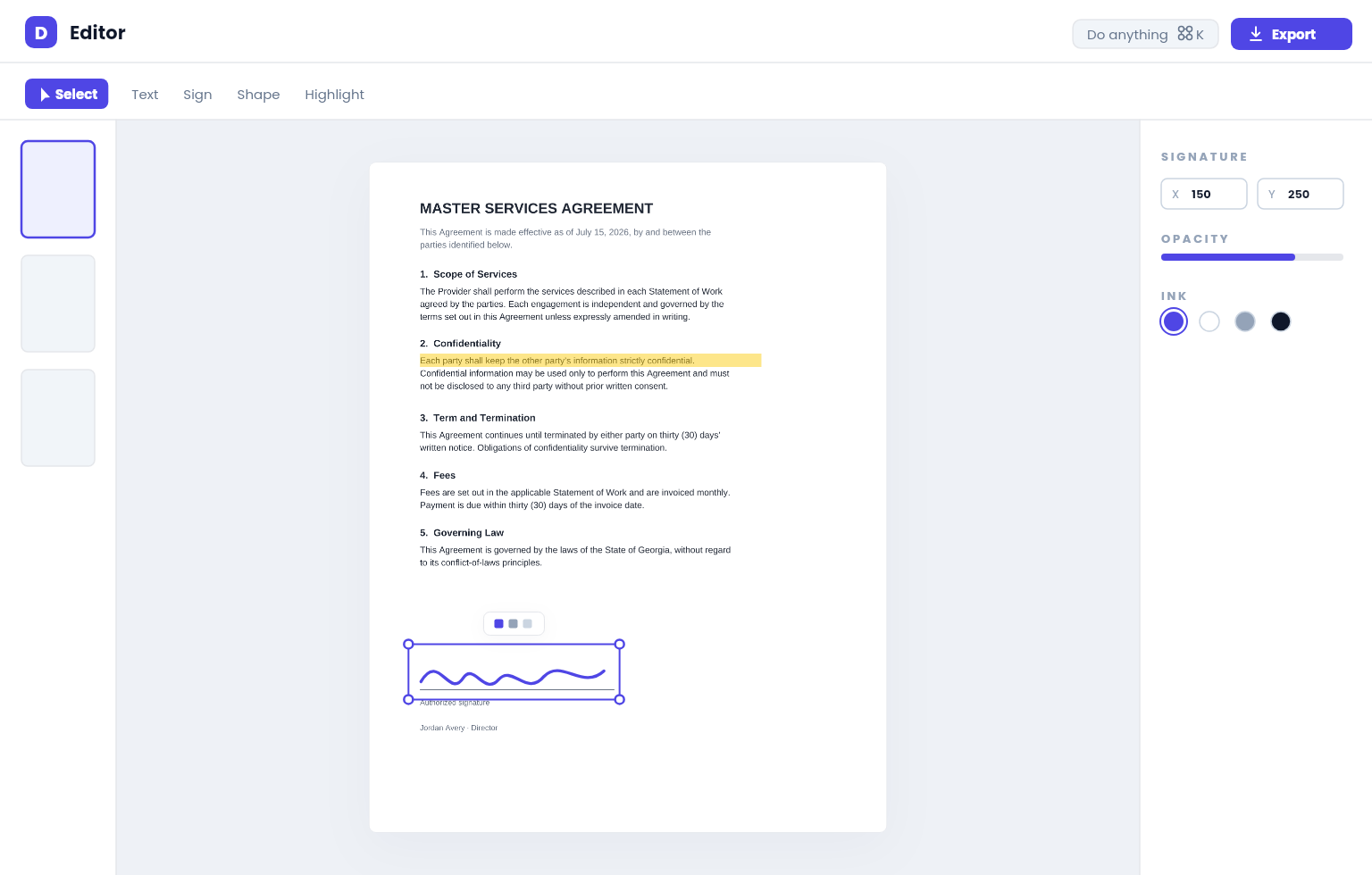
Explore all toolsThe DiemDesk Editor
Your PDF, your canvas.
Annotate, sign, redact and edit with the precision of a design tool and the ease of a doc — ⌘K commands, snap-to guides, a live properties inspector and reusable signatures. Nothing uploaded, ever.
Why DiemDesk
Built private, fast, and free — without the catch.
Files never leave your browser
Core tools run 100% on your device — nothing is uploaded to any server.
Free, no signup
Use the core tools free — no account, no watermark, no catch.
Every device
A premium experience on desktop and mobile. Native apps on the way.
No daily limits
Use every in-browser tool as often as you like — no 2-tasks-a-day caps like other sites. (Office conversions: 3 free a day.)
80
Tools and growing
0
Ads or trackers
0
Files uploaded
for in-browser tools
$0
To get started
DiemDesk vs typical PDF sites
Both are free to start — but a typical free plan caps everyday use, and lifting those caps is what costs $4–20/mo. Ours has no such cap. An optional Pro plan (planned ~$5.98/mo) later adds power features like batch and OCR, not everyday limits.
Simple pricing
Start free. Upgrade when you need more.
Free
$0/forever
- Every everyday tool — PDF, image, video & utilities
- Unlimited on-device tools — no daily limits
- Big files free — up to 100 MB in your browser
- Full-strength compression — Strong & Maximum
- Sign PDFs now — annotate & basic redaction coming soon
- 3 free Office conversions a day (PDF ↔ Word/Excel/PPT)
Pro
$5.98/mo
or $60 billed yearly
- Everything in Free — with more scale
- Unlimited file size (free already handles up to 100 MB)
- Batch processing — many files at once
- Edit PDF text + Search & pattern redaction
- Unlimited Office conversions + OCR — no daily cap, any size
- AI document suite — chat, cited summaries, translate, question generator, AI find-personal-info, table clean-up (launching with Pro)
Common questions
Is it really free?
Yes — the in-browser tools are free forever, with no signup, no watermarks and no daily limits, on files up to 100 MB. The few tools that run on our servers (Office conversions) give you 3 free a day; unlimited is a Pro feature. Because the in-browser tools cost us nothing to run, they stay free — we only meter what actually uses our servers.
Are my files private?
The core tools run entirely in your browser, so your files are never uploaded. A few tools (OCR, Office conversions) use our servers and are processed then deleted — and we say which, up front.
Do I need an account?
No. Use any tool without signing up. An account only matters later, for Pro.
Which browsers work?
Any modern browser — Chrome, Edge, Firefox or Safari — on desktop or mobile.
Is it safe for sensitive documents?
Yes. Because in-browser tools never send your file anywhere, you can check for yourself: open your browser’s Network tab while you use a tool and you’ll see zero uploads.
Ready when you are.
Start with 80+ private tools — free, no signup, and nothing ever leaves your device.